


A checklist is a list of the things that must be done, or checked, for a job to be complete. Each item is ticked off as it’s done, so anyone can see what’s finished and what’s left. That’s all it is, and that simplicity is its strength.
Checklists aren’t for teaching people how to do a job. A chef closing a kitchen knows how to clean a fryer; a pilot knows how to set the flaps. A checklist is for making sure the steps that matter actually happen, every time, even at the end of a long shift, during an interruption or when someone is covering for a colleague. It protects against forgetting, not against not knowing.
A useful checklist has five parts:
| Part | What it does | Example |
|---|---|---|
| A clear name | Says what the checklist is for | “Kitchen closing checklist” |
| A trigger | Says when it’s used | “After the last order, before the kitchen is locked” |
| Items | The tasks or checks, each starting with a verb | “Record the walk-in fridge temperature” |
| A standard for each item | Says what “done” means, where it isn’t obvious | “Between 0 °C and 5 °C. Tell the manager if it’s outside that range.” |
| A sign-off | Records who completed it and when | Name, date and time, and a manager’s approval where needed |
People are good at complex work and bad at remembering routine steps under pressure. When we’re busy, tired or interrupted, the steps we skip are rarely the hard ones. They’re the simple ones we’ve done a hundred times: locking the back door, recording the fridge temperature, checking the ladder’s feet.
The surgeon and writer Atul Gawande, whose 2009 book The Checklist Manifesto made the case for checklists outside aviation, draws on a distinction between two kinds of failure: ignorance (we don’t know enough) and ineptitude (we know, but don’t apply what we know). Training fixes the first. Checklists fix the second.
A good checklist also does three quieter jobs:
The modern checklist was born in a crash. On 30 October 1935, the US Army Air Corps was evaluating Boeing’s Model 299, the prototype of what became the B-17 bomber, at Wright Field in Dayton, Ohio. Shortly after take-off, it stalled and crashed, killing two of the crew, including the pilot, Major Ployer P. Hill. The inquiry found nothing wrong with the design and blamed pilot error. The plane was simply more complicated than any before it, and one step had been missed.
Rather than more training, the Air Corps’ test pilots wrote a simple pilot’s checklist for take-off, flight, landing and taxiing. With it, the aircraft went into service, and checklists became standard practice across aviation.
Medicine followed decades later, with striking results:
A small business isn’t an operating theatre. But the lesson carries over: when skilled people do routine steps under pressure, a short list of the steps that matter most prevents most of the expensive mistakes.
Aviation uses two formats, and the choice matters more than most people realise.
| Format | How it works | Use it when | Example |
|---|---|---|---|
| READ-DO | Read each item, do it, tick it, then move to the next | The task is unfamiliar, done rarely, or the order matters | Shutting down and isolating a machine before maintenance; a once-a-year stocktake |
| DO-CONFIRM | Do the work from memory, then stop and confirm each item was done | The task is familiar and done often, by trained people | A daily kitchen close; a pre-start safety check on site |
Most business checklists are DO-CONFIRM: staff know the routine and the checklist catches what slipped. Use READ-DO where a missed or out-of-order step could hurt someone or cost real money.
Checklists are usually named after what they’re for. These are the ones most small businesses use:
| Type | What it covers | Free template |
|---|---|---|
| Opening and closing | Everything that must happen before the doors open and after they close | Restaurant opening and closing checklist |
| Cleaning | Daily, weekly and deep-clean tasks by area | Kitchen cleaning checklist |
| Safety and pre-start | Hazards, equipment and protective gear checked before work begins | Daily pre-start safety checklist |
| Inspection and audit | Checks of equipment, premises or work against a standard | Gym equipment inspection checklist |
| Onboarding and induction | Tasks that take a new hire from offer to fully trained, with due dates | New hire onboarding checklist |
| Offboarding and handover | Access removed, equipment returned and knowledge handed over | Employee offboarding checklist |
| Job or project | The steps that make a piece of work complete before it’s handed over | Job completion checklist |
| Periodic admin | Month-end, payroll and other regular finance tasks | Month-end close checklist |
Checklists also differ in how often they run. A recurring checklist, such as a daily close, runs on a schedule and starts fresh each time. A one-off checklist, such as onboarding or a move-out inspection, is worked through once per case: per new hire, per property or per job.
Some checklists only help the team get the work done. Others are evidence. A compliance checklist is one whose completed record shows that a legal, regulatory, contractual or industry requirement was met: fridge temperatures checked, a pre-start safety check done, an infection control round completed, a trust account reconciled. If an inspector, auditor, insurer or client could ask to see it, it’s a compliance checklist.
The items might look the same. What changes is what the checklist has to prove afterwards.
| Everyday checklist | Compliance checklist | |
|---|---|---|
| Main job | Help people get the work done | Prove the work was done, to a required standard |
| Where the items come from | The team’s experience | A regulation, standard, licence condition, contract or policy |
| What’s recorded | A tick | Who did each item and when, plus readings, photos and a sign-off where required |
| When something’s wrong | Fix it next time | Record what was done about it, such as discarding food or tagging out a tool |
| Who can change it | Whoever runs it | The owner, with the change recorded, so you can show which version was in use |
| Old records | Thrown away | Kept for as long as your rules require, and easy to find |
| Missed runs | Rarely noticed | A gap in your records, which an auditor will find |
To hold up in an audit, a compliance checklist needs a few things an everyday list doesn’t:
Two cautions. First, not every checklist needs to be a compliance checklist: treating the stationery order like a food safety record buries the checks that matter under paperwork. Second, a checklist doesn’t make you compliant on its own. It records that you did what your rules require, so check those rules where you work, and keep the checklist up to date when they change.
| What it is | Answers | Example | |
|---|---|---|---|
| To-do list | Personal tasks, in any order, that change every day | “What do I need to get done?” | Call the supplier, reply to Sam, order more gloves |
| Checklist | A fixed list of tasks or checks for a recurring job, ticked off and signed | “Did we do everything?” | The kitchen closing checklist |
| SOP | Written step-by-step instructions for doing a procedure | “How exactly do I do this?” | How to clean and sanitise the slicer, with photos |
A checklist and an SOP work as a pair. The US Environmental Protection Agency’s guidance on writing procedures puts it neatly: “the checklist is not the SOP, but a part of the SOP.” The SOP teaches the job; the checklist confirms it was done. When a checklist item needs explaining, link it to the SOP rather than squeezing instructions into the list. If you’re new to SOPs, start with what is a standard operating procedure.
Run by the site lead before work starts each day, with the whole crew:
Ten items or fewer, each a verb, each something that has hurt someone when it was missed. Get the full version as the daily pre-start safety checklist.
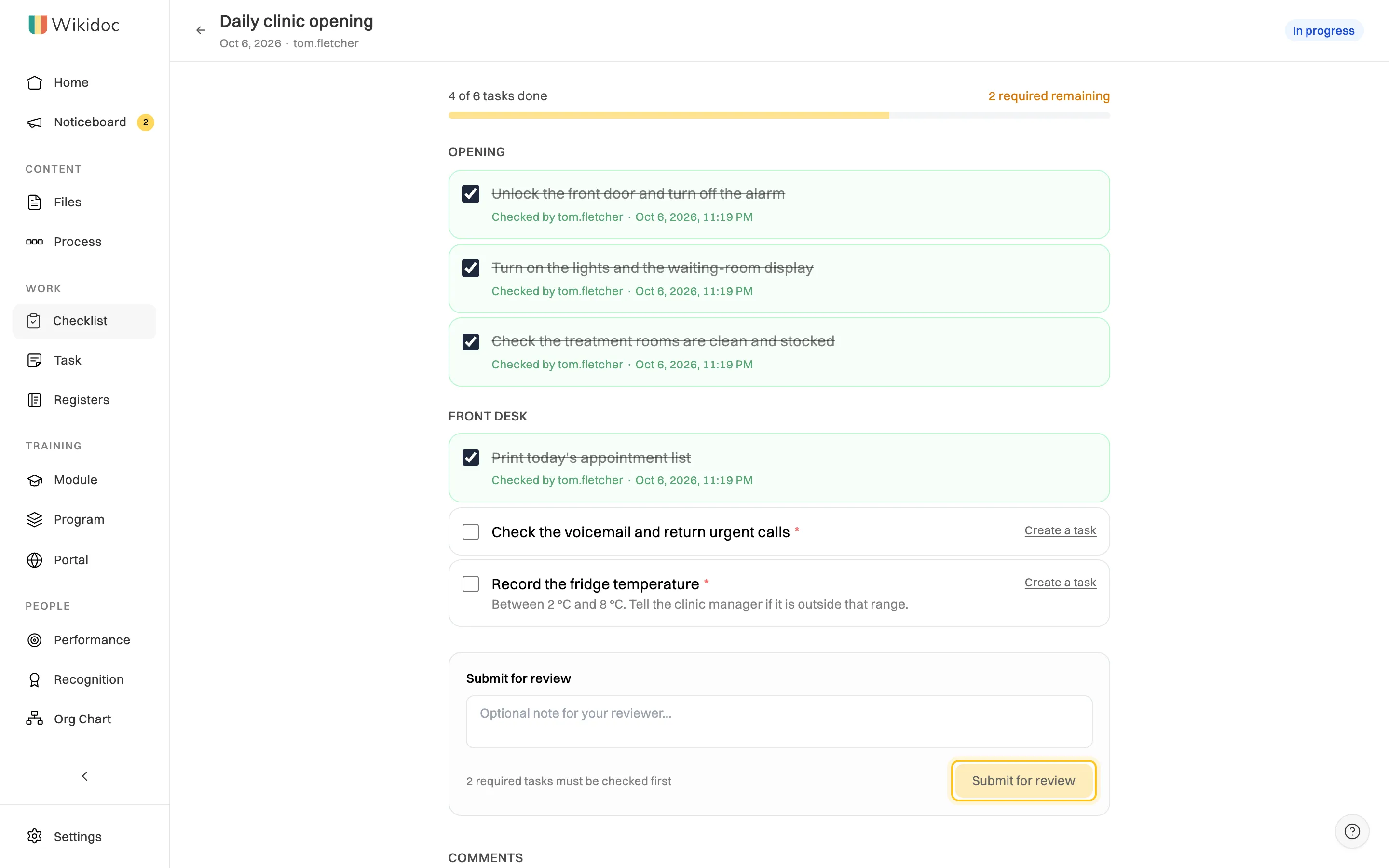
Some items need a standard, not just a tick. A clinic’s opening checklist might include:
The standard turns “check the fridge” into something anyone can do the same way, and marking an item required means the checklist can’t be signed off without it. See the clinic opening and closing checklist.
Onboarding checklists have a different shape: each item has an owner and a due date, and the list runs once per new hire.
| Task | Owner | Due |
|---|---|---|
| Laptop, email and system access ready | IT or admin | Before day 1 |
| Welcome, tour and introductions | Manager | Day 1 |
| Health and safety induction completed | Manager | Day 1 |
| Contract, tax and bank forms returned | HR or admin | Day 1 |
| First-week plan and training modules assigned | Manager | Day 1 |
| 30-day check-in booked | Manager | Week 1 |
Our guide to the new hire onboarding checklist covers the full journey, from pre-boarding to day 90.
If you’d like a head start, describe your business and the jobs you need covered in Wikidoc’s free AI checklist generator, and it drafts the checklists for you to edit.
Paper checklists are cheap and easy to start with. Their weakness is that you only find out what was missed when someone goes looking, and the records end up in a folder nobody can search.
| Paper | Digital | |
|---|---|---|
| Seeing what’s been done | Walk over and look, or ask | See every location and shift live, from anywhere |
| Missed or late checklists | Found days later, if at all | Flagged as overdue the same day |
| Who did it and when | A signature and a written time, easy to fill in afterwards | Each tick recorded with the person and a timestamp |
| Proof | “Trust me” | Photos attached to the items that need them |
| Sign-off | Initials on the sheet | A named approver approves or rejects, with notes |
| Audits and inspections | Search through folders | Export the run history for any date range |
| Updating the list | Reprint and replace every copy | Change it once, and the next run uses the new version |
| Mistake | Why it fails | Do this instead |
|---|---|---|
| Listing every step of the job | It takes too long, so people tick without reading | Keep the critical and easily missed items; put the rest in the SOP |
| Vague items | “Clean kitchen” means something different to everyone | Be specific and add the standard |
| No trigger or owner | Nobody knows when it’s due or whose job it is | Name when it runs, who runs it and who checks it |
| Ticking without checking | The checklist becomes a ritual, not a check | Ask for photos or readings on the items that matter, and spot-check |
| Nobody looks at the results | Missed items are never followed up | Review completed checklists, and act on what’s missed |
| Never updated | The list stops matching the work, and people stop trusting it | Give each checklist an owner who updates it when things change |
Download these as PDFs, CSVs or Word files, or open them in Wikidoc as live checklists:
See every template, by industry, in the templates library.
Wikidoc’s compliance checklists turn your lists into recurring checklists that log themselves. Set the items, who runs them, who approves them and how often they repeat, and each period every assignee gets a fresh run. Each tick is recorded with the person and the time, required items and photos must be done before a run can be submitted, and the approver can’t be the person who did the work.
You can see at a glance which checklists are overdue or need attention, and export the run history as a CSV for any date range when an inspector or auditor asks. Start from a template, build your own, import a CSV or Excel file, or point AI at one of your SOPs and it drafts the checklist items for you. The Free plan includes three checklists, and the Help Centre shows how to build a checklist template and run a checklist.
Start free and turn the job that’s most often missed into a checklist today.
A checklist makes sure the important steps of a job are done every time, without relying on memory. It catches the routine steps people skip when they’re busy or interrupted, sets one standard for everyone, and creates a record of who did the work and when.
By format, checklists are READ-DO, where you do each item as you read it, or DO-CONFIRM, where you work from memory and then confirm. By purpose, the common types are opening and closing, cleaning, safety and pre-start, inspection and audit, onboarding, offboarding, job completion and periodic admin checklists.
A compliance checklist is a checklist whose completed record is evidence that a legal, regulatory or industry requirement was met, such as food temperature checks, pre-start safety checks or infection control rounds. Unlike an everyday checklist, it records who did each item and when, with readings, photos and a manager’s sign-off, and the records are kept for audits.
An SOP explains how to do a procedure, step by step, for someone learning it. A checklist confirms the critical steps were done, for someone who already knows how. They work together: the SOP trains the job, and the checklist checks it each time, linking back to the SOP where an item needs explaining.
As few as will do the job. A common rule of thumb is five to nine items per section, covering the steps that are critical or most often missed, so the list can be run in a minute or two. Longer jobs can be split into sections or separate checklists.
For recurring and compliance work, usually yes. Digital checklists record who ticked each item and when, flag missed checklists the same day, take photos as proof and keep a searchable history for audits. Paper is fine for getting started, but missed items and records are much harder to track.


