.png)

An SOP lists the ordered steps for one procedure. A work instruction is a more granular, single-task version of an SOP - usually how to operate one specific tool or machine. A process map is a visual flowchart showing how a process moves across roles, systems, and decisions, including branches. Most real operations need a mix of all three, layered.
The confusion isn't really about definitions - it's that a five-step task, a forty-step cross-department workflow, and "which button do I press on this specific machine" all get called "the process," and teams reach for one document type to cover all three.
Knowing the theory doesn't tell you how to actually produce all three without tripling your documentation workload. The second half of this article walks through exactly that - capturing one end-to-end procedure, then layering the SOP and work-instruction detail underneath it without re-writing anything from scratch.
Complex processes usually need to be layered, not merged into one document: a process map gives the bird's-eye view of "order comes in → goes to warehouse → goes to shipping → closes," while each box on that map can link out to the detailed SOP for how that specific step gets done. A work instruction sits one level deeper still - inside the "pack the order" SOP, a work instruction might cover exactly how to operate the label printer.
Trying to cram all three levels into one document is why so many "process docs" end up either too vague to follow (all map, no steps) or unreadable (a wall of text trying to also explain organizational flow).
That's the theory. In practice, almost nobody builds these three documents separately - they build one process map for the whole procedure, then progressively add detail to it. Here's what that actually looks like end to end, using Wikidoc as the worked example, since "layer the documents" is an abstract instruction until you see what a node with an SOP, a sub-process, and a checklist attached to it actually looks like.
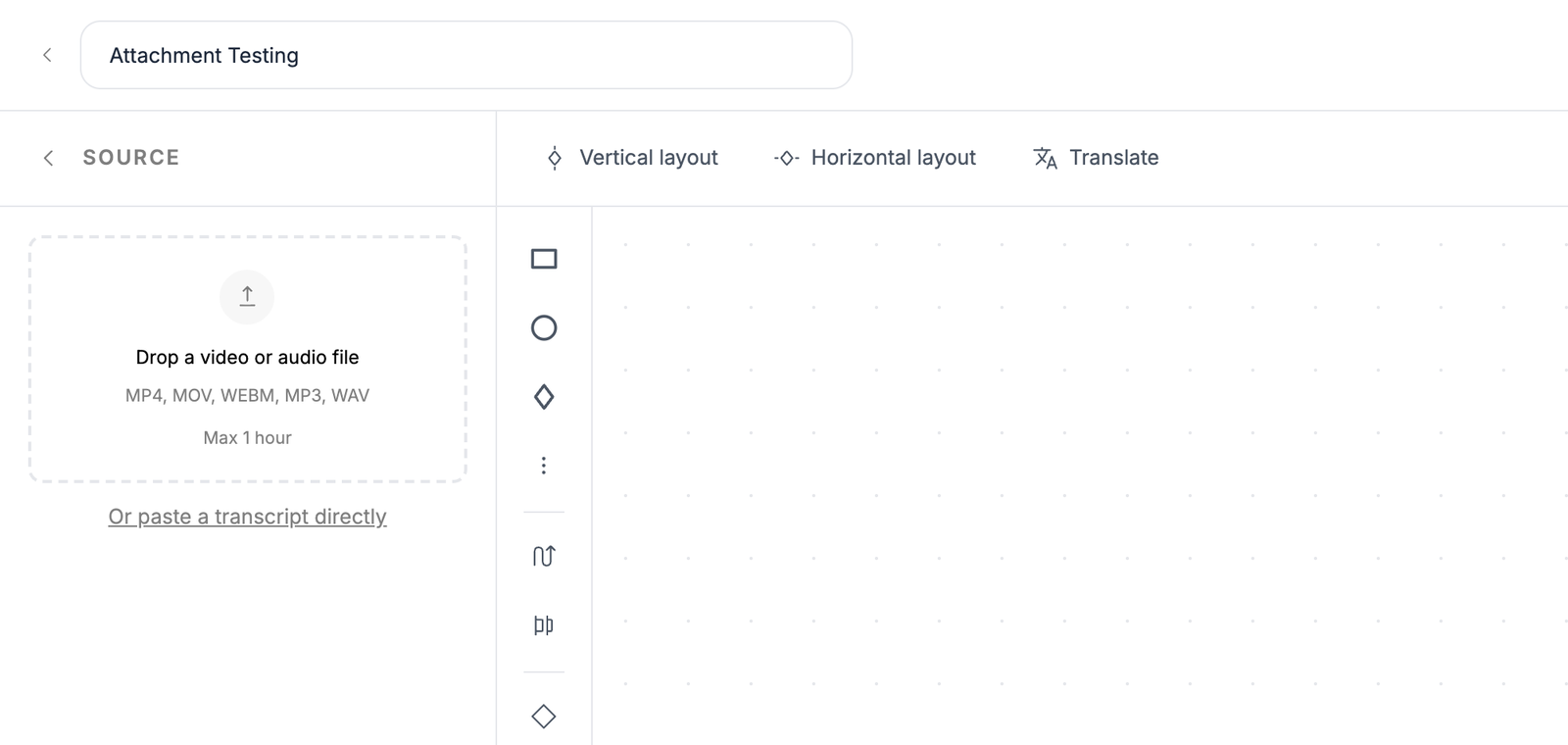
Skip the blank canvas. The fastest way to get an accurate top-level process map isn't to sit down and remember every step - it's to record the conversation where the team already walks through it. Upload a recording of a process-review meeting, a Zoom call where someone explains the workflow, or even a phone recording - Wikidoc accepts video and audio directly (MP4, MOV, WEBM, MP3, WAV, up to an hour) and drafts the stages, roles, and decision points into a flowchart automatically. If you already have meeting notes or minutes instead of a recording, paste the transcript directly and skip transcription entirely.
Once the top-level map exists - say, four boxes running "Order intake → Fulfillment → Billing → Close" - each box is a candidate for its own SOP: the detailed, numbered steps for that one stage, written by whoever owns it. Attach that document directly to the node instead of leaving it as a separate file someone has to remember to link. The map stays the bird's-eye view; the attached SOP is where "how do I actually do this" gets answered, exactly matching the SOP definition from the top of this article - one procedure, one owner, one set of ordered steps.
Some stages are too complex for a single SOP. "Fulfillment" might really be five separate steps spanning two teams - receiving, picking, packing, labeling, and shipping. Expand that one node into its own linked sub-process: a full child process map, with its own nodes, that opens without leaving the parent diagram. Inside it, the "labeling" node can carry the genuinely granular detail - a work instruction for operating the label printer, a pre-ship QA checklist, the training module a new picker has to pass before touching the station. This is the same three-layer structure from the comparison table above, just built by drilling down instead of by deciding in advance how deep each branch needs to go.
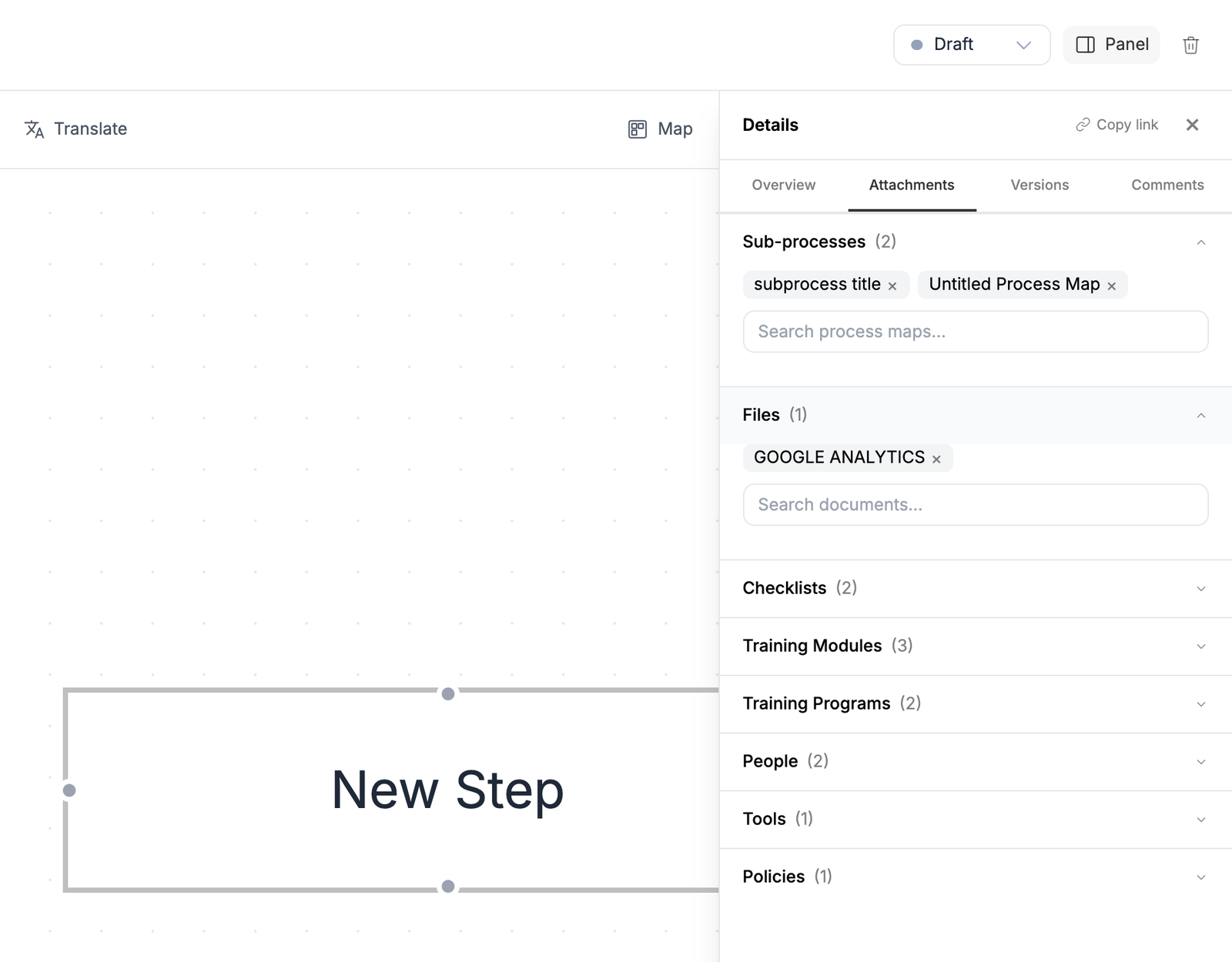
Put together, the three layers on one real process look like this:
This is the same shape as the "Operations" use case teams reach for when they map order-to-cash or similar cross-department processes end to end - subprocesses per department, with an owner and the right tools attached at each one, so restructuring a team or losing a person never leaves a step with nobody responsible for it.
A single, giant "here's how order-to-cash works" document forces every reader to wade through detail irrelevant to their role to find the two paragraphs that matter to them. The layered version lets a new hire start at the map, see the four stages and how they connect, and drill down only as far as their actual job requires - a biller never needs to open the label-printer instruction, and a picker never needs to read the invoicing SOP. Ownership also gets assigned at the right altitude: someone owns the overall process, and someone else owns the specific station-level detail, instead of one document trying to answer to both.
Is a work instruction the same as an SOP?
No. An SOP covers a full procedure end to end; a work instruction is a narrower, more granular document covering exactly how to operate one specific tool, machine, or sub-step - often referenced from inside a larger SOP.
What's the difference between a process map and a flowchart?
In practice they're the same thing - a process map is a flowchart applied to a business process, typically using standard shapes for steps, decisions, and handoffs (often following BPMN conventions) so it reads consistently across teams.
Do small businesses need process maps, or just SOPs?
If a process stays within one role, an SOP alone is usually enough. Once a process crosses two or more roles or departments - sales handing off to fulfillment, for example - a process map prevents the handoff itself from becoming the point where things get dropped.
Which should I write first when starting from nothing?
Write the SOP first. It's faster to produce, immediately useful, and you'll often discover the process map is needed anyway once you notice the SOP keeps saying "then hand off to..."
Can a node become its own detailed process?
Yes - this is usually called expanding a node into a sub-process. The node links out to its own child process map, which can in turn carry attached SOPs, checklists, and work instructions.
Do the map and the SOP stay in sync if the process changes?
They will if the SOP is attached to the node by reference rather than copied into it - editing the source document then updates it everywhere it's linked.