
Plans compared: Free, Pro and Team
Prices, limits and features on each plan.
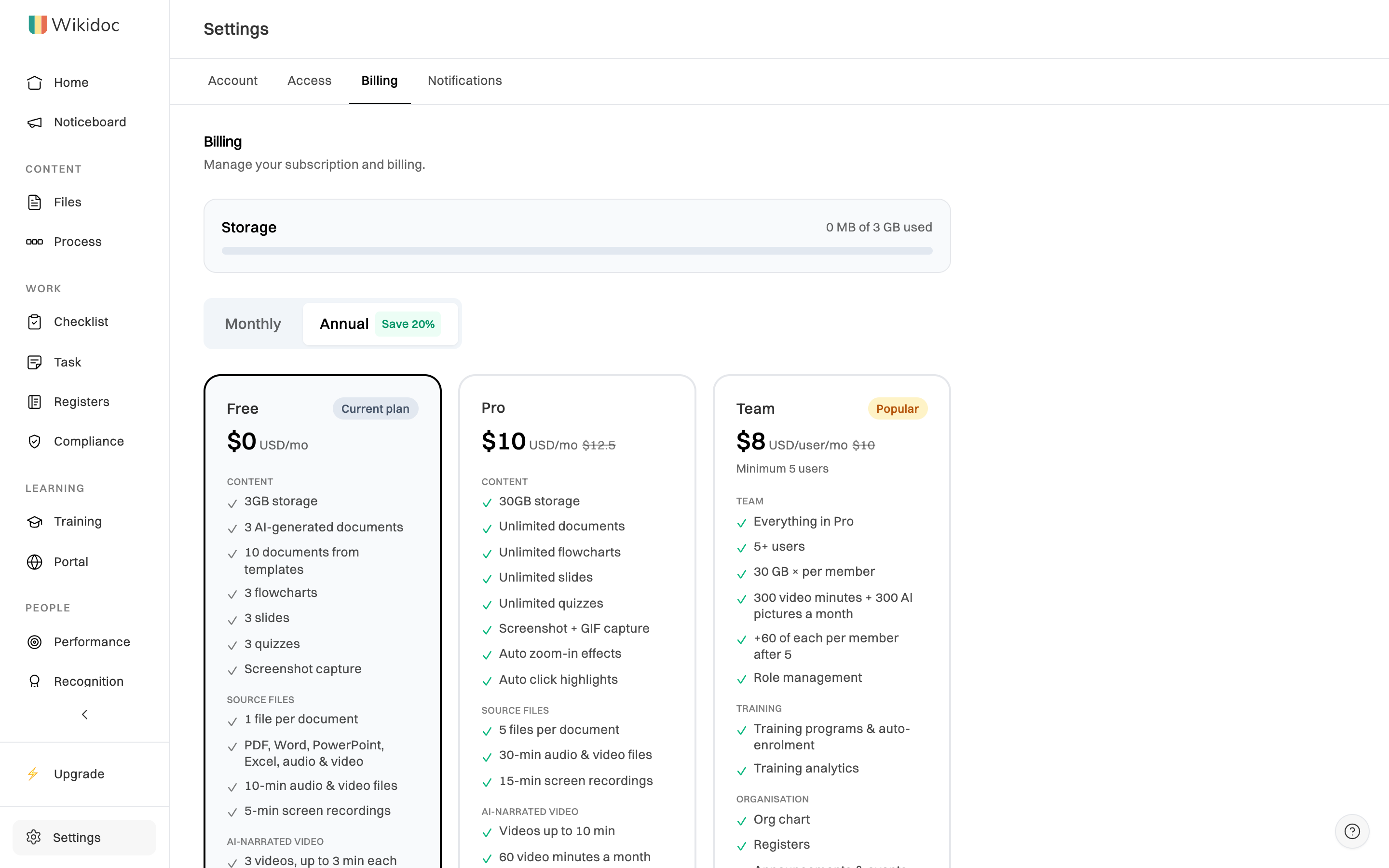
Wikidoc has three plans:
- Free: for trying Wikidoc. Three of each kind of AI-made content, plus 10 documents and 10 process maps from templates, and Scenario videos with 15 AI pictures a month, no card needed.
- Pro: for one person who documents a lot. Unlimited documents, process maps, slides, quizzes, training modules and checklists, plus 60 video minutes and 60 AI pictures a month for AI-narrated videos.
- Team: for a whole organisation. Everything in Pro, with 300 video minutes and 300 AI pictures a month shared by the organisation (plus 60 of each for every member after 5), and training programs, the org chart, registers, Compliance, approvals, checklists, task boards, the Noticeboard, analytics, performance, recognition, client portals, and a custom logo and sidebar layout. One subscription covers every member.
Prices and limits
Section titled “Prices and limits”| Free | Pro | Team | |
|---|---|---|---|
| Billed monthly | $0 | $12.50 / month | $10 / seat / month |
| Billed annually | $0 | $10 / month$120 once a year | $8 / seat / month$96 per seat once a year |
| Seats | 1 | 1 | 5 minimum |
| AI-generated documents | 3 | Unlimited | Unlimited |
| Documents from templates | 10 | Unlimited | Unlimited |
| Process maps | 3 | Unlimited | Unlimited |
| Process maps from templates | 10 | Unlimited | Unlimited |
| Training modules you create | 3 | Unlimited | Unlimited |
| Checklists | 3 | Unlimited | Unlimited |
| Slides | 3 | Unlimited | Unlimited |
| Quizzes | 3 | Unlimited | Unlimited |
| Source files per document | 1 | 5 | 5 |
| Audio and video file length | 10 minutes | 30 minutes | 30 minutes |
| Screen recording length | 5 minutes | 15 minutes | 15 minutes |
| AI-narrated videos | 3 | Within monthly minutes | Within monthly minutes |
| Length of each AI-narrated video | Up to 3 minutes | Up to 10 minutes | Up to 10 minutes |
| Video minutes a month | — | 60 | 300, plus 60 per member after 5 |
| Scenario-style videos | Yes | Yes | Yes |
| AI pictures a month (Scenario videos) | 15 | 60 | 300, plus 60 per member after 5 |
| File storage | 3 GB | 30 GB | 30 GB per member |
| GIF images in documents | — | Yes | Yes |
| Automatic click highlights | — | Yes | Yes |
| Translation languages | 5 | 17 | 17 |
| AI narrator voices | 3 | 10 | 10 |
| Video export quality | Up to 720p | Up to 4K | Up to 4K |
| ZIP and SCORM 1.2 export | — | Yes | Yes |
| Quiz export (QTI, GIFT) | — | Yes | Yes |
| Portal guests | — | — | Unlimited, never take a seat |
All prices in US dollars.
You’ll find the same plans, with your current one marked, in Settings›Billing. Switch between Monthly and Annual above the plans to see both prices. Annual billing saves 20%.
Features only on Team
Section titled “Features only on Team”These features need a Team plan. On Free or Pro you’ll see an upgrade prompt where they would be.
- Training programs
- Org chart
- Registers
- Compliance: obligations, issues and the policy builder
- Document approvals and comments
- Analytics
- Performance reviews
- Recognition
- Client portals
- Task boards
- Noticeboard announcements and events
- Sidebar configuration: your company logo and group order
If your organisation moves from Team to a lower plan, what you already made with Team features, such as training programs, the org chart, registers, Compliance and task boards, stays visible but becomes read-only. Checklists keep running and stay editable after any downgrade; on Free you can’t create a new one until you’ve made fewer than 3. The sidebar goes back to Wikidoc’s logo and group order; your logo and order are kept and come back if you return to Team. See What happens when a plan or trial ends.
Trying before you buy
Section titled “Trying before you buy”Pro comes with a 14-day free trial, with no card needed. An organisation with 5 or more members can also try Team once. See Start a free trial.
Changing plans
Section titled “Changing plans”Upgrade or cancel from Settings›Billing. To change your number of seats, or to switch between monthly and annual billing once you’re subscribed, contact support.